Android 16 ships a platform feature called App Functions. It lets an AI assistant — like Google Gemini — discover and call typed functions inside your app from a natural-language request, without the user opening your app.
You annotate a suspend fun with @AppFunction. A KSP compiler plugin reads your KDoc and turns it into an XML schema. Android indexes that schema when the app installs. When a user says “set a 10-minute pasta timer,” an assistant like Gemini matches the request to your function and calls it. Your function runs locally, inside your app’s own process.
Think of it as Android’s native answer to MCP: a standard, OS-level way for an assistant to call into your app, with no custom agent runtime to maintain.
This post walks through a real demo: a smart-home app with three functions — startTimer, cancelTimer, and toggleDevice. All code is from a working project verified on an API 37 / Android 17 emulator on 2026-06-25.
How It Works
Here is the full path a call takes:
- You write a
suspend funand annotate it with@AppFunction(isDescribedByKDoc = true) - KSP reads the KDoc and generates
app_functions.xmlinside the APK - Android indexes that XML via AppSearch when the app installs
- An assistant (Gemini, OEM agent) queries AppSearch to discover what your app can do
- It calls your function via the platform
AppFunctionManager - Your function runs inside your app’s process and returns a typed result
The KDoc is what the agent reads to decide which function to call and how to fill the parameters. KDoc quality is the primary lever for agent accuracy. A neat loop: let an AI coding agent draft these KDocs from your function signatures — one LLM writing the descriptions another LLM (Gemini) will later read. Document @throws too; agents use the failure boundaries to correct a bad call.
The Three Functions
The demo exposes all three functions in one class. Here is startTimer in full:
// SmartHomeFunctions.kt
class SmartHomeFunctions(
    private val timerRepository: TimerRepository,
    private val deviceRepository: DeviceRepository,
) {
    /**
     * Starts a countdown timer on the device.
     *
     * Use this function when the user asks to set a timer, start a countdown, or be reminded
     * after a specific duration. For example: "set a 10-minute pasta timer".
     *
     * @param appFunctionContext The execution context provided by the App Functions runtime.
     * @param durationSeconds Total duration of the timer in seconds. Must be greater than zero.
     * @param label Optional human-readable name displayed next to the timer in the UI.
     * @return A [TimerResult] describing the created timer, including its generated ID.
     * @throws AppFunctionInvalidArgumentException if durationSeconds is not greater than zero.
     */
    @AppFunction(isDescribedByKDoc = true)
    suspend fun startTimer(
        appFunctionContext: AppFunctionContext,
        durationSeconds: Int,
        label: String? = null,
    ): TimerResult = withContext(Dispatchers.Default) {
        if (durationSeconds <= 0) {
            throw AppFunctionInvalidArgumentException(
                "durationSeconds must be greater than zero, got $durationSeconds",
            )
        }
        val resolvedLabel = label ?: "Timer"
        val timerId = timerRepository.createTimer(
            durationSeconds = durationSeconds,
            label = resolvedLabel,
        )
        TimerResult(timerId = timerId, durationSeconds = durationSeconds, label = resolvedLabel)
    }
A few rules every App Function must follow:
- It must be a
suspend fun - The first parameter is always
AppFunctionContext— the runtime provides it - Parameter types (common examples): primitives (
Int,Long,Float,Double,Boolean),String, their nullable forms, primitive arrays, lists, and other@AppFunctionSerializabletypes (which can nest) isDescribedByKDoc = truetells the compiler to embed your KDoc into the schema
The return type is a data class annotated with @AppFunctionSerializable:
@AppFunctionSerializable(isDescribedByKDoc = true)
data class TimerResult(
    /** Unique identifier assigned to this timer by the system. */
    val timerId: String,
    /** Total duration of the timer in seconds, as requested. */
    val durationSeconds: Int,
    /** Human-readable label displayed next to the timer in the UI. */
    val label: String,
)
Adding isDescribedByKDoc = true on the serializable type embeds each property’s KDoc into the schema too. The agent reads those descriptions when it interprets the result.
The other two functions follow the same pattern. cancelTimer takes a timerId: String and throws AppFunctionElementNotFoundException if the timer does not exist. toggleDevice takes deviceId: String and on: Boolean and returns a DeviceStateResult with a confirmation message.
The Debug Screen
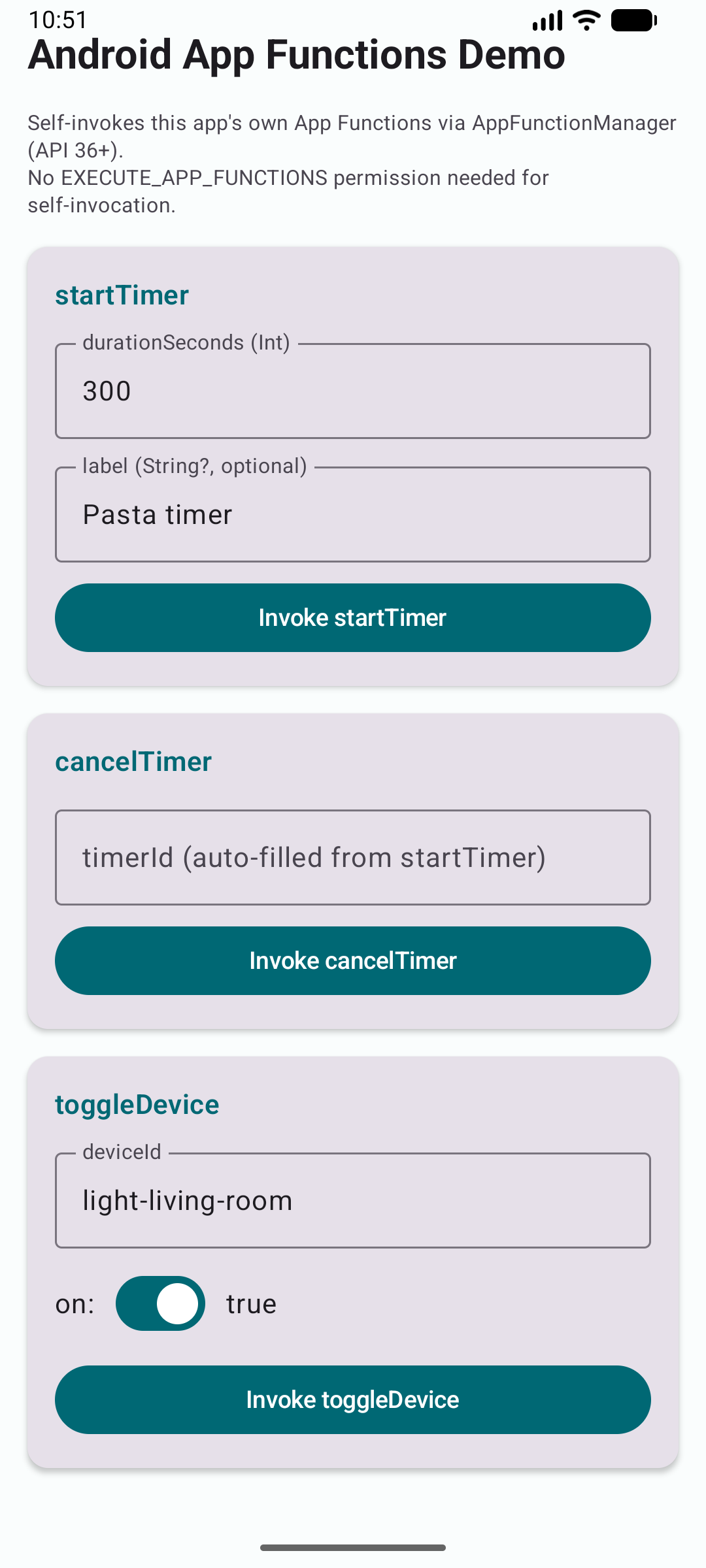
The demo app has one Compose screen with a card for each function. You enter parameters, tap a button, and see the raw result. It is the fastest way to iterate before Gemini integration exists.
Setup: Dependencies and KSP
Three artifacts, all at version 1.0.0-alpha09 (latest as of June 2026):
# gradle/libs.versions.toml
[versions]
appfunctions = "1.0.0-alpha09"
ksp           = "2.3.6"
kotlin        = "2.3.21"

[libraries]
androidx-appfunctions          = { module = "androidx.appfunctions:appfunctions",          version.ref = "appfunctions" }
androidx-appfunctions-service  = { module = "androidx.appfunctions:appfunctions-service",  version.ref = "appfunctions" }
androidx-appfunctions-compiler = { module = "androidx.appfunctions:appfunctions-compiler", version.ref = "appfunctions" }

[plugins]
ksp = { id = "com.google.devtools.ksp", version.ref = "ksp" }
In the app module’s build.gradle.kts:
plugins {
    alias(libs.plugins.ksp)
}

android {
    compileSdk = 37
    defaultConfig {
        minSdk = 36   // the platform App Functions API lands in Android 16
        targetSdk = 37
    }
}

dependencies {
    implementation(libs.androidx.appfunctions)
    implementation(libs.androidx.appfunctions.service)
    ksp(libs.androidx.appfunctions.compiler)
}

// Set this in the app module only — generates app_functions.xml
ksp {
    arg("appfunctions:aggregateAppFunctions", "true")
}
The aggregateAppFunctions KSP arg must go in the app module only. If you set it in a library module as well, you will get duplicate schema registrations.
You do not need to add anything to AndroidManifest.xml for the functions themselves. KSP generates the App Functions schema inside the APK, and the Jetpack library wires up the service binding automatically.
The demo also includes an app_metadata.xml resource that gives the agent a plain-English description of the whole app — useful for multi-step workflows where the agent needs high-level context before picking individual functions.
What KSP Actually Generates
It is not a black box. Here is a trimmed excerpt of the schema KSP produced for startTimer (pulled straight from the build output). Notice how each KDoc line maps directly into a <description> the agent reads:
<!-- generated app_functions.xml (excerpt, trimmed for readability) -->
<appfunction>
    <id>com.kemalcodes.smarthome.appfunctions.SmartHomeFunctions#startTimer</id>
    <enabledByDefault>true</enabledByDefault>
    <description>Starts a countdown timer on the device.

 Use this function when the user asks to set a timer, start a countdown, or be reminded
 after a specific duration. For example: "set a 10-minute pasta timer".</description>
    <parameters>
        <name>durationSeconds</name>
        <isRequired>true</isRequired>
        <description>Total duration of the timer in seconds. Must be greater than zero.</description>
    </parameters>
    <response>
        <valueType>
            <dataTypeReference>...SmartHomeFunctions$TimerResult</dataTypeReference>
        </valueType>
        <description>A TimerResult describing the created timer, including its generated ID.</description>
    </response>
</appfunction>
Your Kotlin KDoc is the agent’s API documentation. That is why writing it well matters more than any other single thing.
Wiring the Factory (No DI Framework Needed)
If your function class has constructor dependencies, the runtime cannot instantiate it by reflection alone. Implement AppFunctionConfiguration.Provider in your Application class:
class SmartHomeApplication : Application(), AppFunctionConfiguration.Provider {

    // Shared singletons — live for the lifetime of the process
    val timerRepository = TimerRepository()
    val deviceRepository = DeviceRepository()

    override val appFunctionConfiguration: AppFunctionConfiguration
        get() = AppFunctionConfiguration.Builder()
            .addEnclosingClassFactory(SmartHomeFunctions::class.java) {
                SmartHomeFunctions(timerRepository, deviceRepository)
            }
            .build()
}
This demo uses manual injection — no Hilt needed for a single-module project. If you already use Hilt, inject via Provider<T> and call .get() inside the factory lambda instead.
Register it in the manifest:
<application android:name=".SmartHomeApplication" ...>
Testing Without Gemini
Gemini end-to-end is EAP-only as of June 2026. But the full invocation stack works right now — two ways.
Option 1 — ADB (fastest feedback loop)
Requires an API 36.1+ emulator or device (the demo verified on API 37 / Android 17).
List registered functions — the output includes your KDoc embedded in the AppSearch schema:
adb shell cmd app_function list-app-functions \
    --package com.kemalcodes.smarthome
Run each command verified in the demo:
# Start a 10-minute timer
adb shell "cmd app_function execute-app-function \
  --package com.kemalcodes.smarthome \
  --function 'com.kemalcodes.smarthome.appfunctions.SmartHomeFunctions#startTimer' \
  --parameters '{\"durationSeconds\":600,\"label\":\"Pasta timer\"}'"
# Cancel it — paste the timerId from the startTimer result
adb shell "cmd app_function execute-app-function \
  --package com.kemalcodes.smarthome \
  --function 'com.kemalcodes.smarthome.appfunctions.SmartHomeFunctions#cancelTimer' \
  --parameters '{\"timerId\":\"<paste-timerId-here>\"}'"
# Toggle a device
adb shell "cmd app_function execute-app-function \
  --package com.kemalcodes.smarthome \
  --function 'com.kemalcodes.smarthome.appfunctions.SmartHomeFunctions#toggleDevice' \
  --parameters '{\"deviceId\":\"light-living-room\",\"on\":true}'"
Quoting matters: wrap the whole command in double quotes, use single quotes around the function ID and the parameters JSON, backslash-escape inner double quotes. This form is verified working on API 37.
Real output from the startTimer call above:
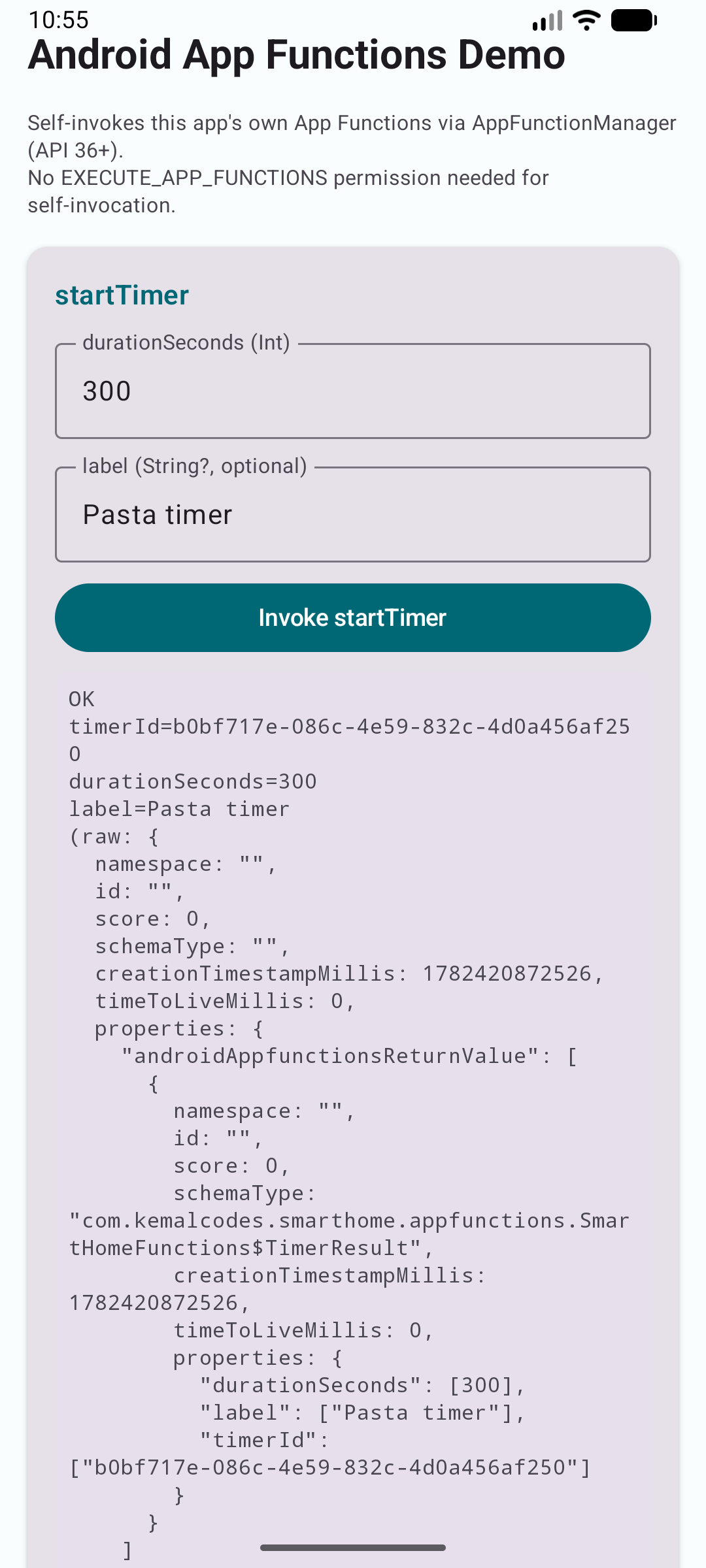
{ "androidAppfunctionsReturnValue": [ { "timerId": ["566b757d-4298-41e4-ab48-a1041348d72b"], "durationSeconds": [600], "label": ["Pasta timer"] } ] }
The result fields are array-wrapped — that is AppSearch’s internal format. cancelTimer with that ID returned success: true (“Timer … cancelled.”). toggleDevice with "light-living-room" and on: true returned “Device light-living-room is now ON.”
If list-app-functions returns empty immediately after install, give it a moment — AppSearch indexing is asynchronous, so the functions usually appear within a few seconds.
Option 2 — Self-Invocation from Your Own App
An app can invoke its own App Functions without any special permission. The platform grants self-invocation unconditionally.
This snippet uses the platform API — android.app.appfunctions.AppFunctionManager with a callback-style executeAppFunction(request, executor, signal, OutcomeReceiver). Jetpack also ships a higher-level androidx.appfunctions.AppFunctionManager wrapper with a suspend signature. Pick one and keep your imports consistent, since the call shapes differ.
The demo wraps the callback API in a coroutine so the Compose UI can call it with a simple scope.launch:
private suspend fun Context.selfInvokeAppFunction(
    functionId: String,
    parameters: GenericDocument,
): Result<ExecuteAppFunctionResponse> {
    val manager = getSystemService(AppFunctionManager::class.java)
        ?: return Result.failure(
            IllegalStateException("AppFunctionManager not available (API < 36?)"),
        )
    val request = ExecuteAppFunctionRequest.Builder(packageName, functionId)
        .setParameters(parameters)
        .build()
    return suspendCancellableCoroutine { cont ->
        val signal = CancellationSignal()
        cont.invokeOnCancellation { signal.cancel() }
        manager.executeAppFunction(
            request,
            mainExecutor, // Context's shared main executor — no per-call thread to leak
            signal,
            object : OutcomeReceiver<ExecuteAppFunctionResponse, AppFunctionException> {
                override fun onResult(result: ExecuteAppFunctionResponse) =
                    cont.resume(Result.success(result))
                override fun onError(error: AppFunctionException) =
                    cont.resume(Result.failure(error))
            },
        )
    }
}
One gotcha: AppSearch has no native Int type. Pass Int parameters as Long using setPropertyLong when building the GenericDocument. The function body receives the value correctly as Int after deserialization.
The result comes back under ExecuteAppFunctionResponse.PROPERTY_RETURN_VALUE as a nested GenericDocument:
val rv = response.getResultDocument()
    .getPropertyDocument(ExecuteAppFunctionResponse.PROPERTY_RETURN_VALUE)
val timerId = rv?.getPropertyString("timerId")
Guardrails: Gate Sensitive Actions
Setting a timer is harmless. toggleDevice("front-door-lock", on = false) is not. Because the assistant chooses which function to call and how to fill the parameters, treat every App Function as an untrusted entry point.
- Don’t expose irreversible or destructive actions without a confirmation step — treat this as a hard rule, not a nicety. Validate and authorize inside the
suspend funbefore you act: check state, ownership, and value ranges. - Return a confirmation flow for risky operations. App Functions can return parcelables such as
PendingIntent. Instead of unlocking the door directly, return aPendingIntentthat opens a confirmation screen, so a human approves the final step. - Keep secrets out of schemas and results. The KDoc descriptions and return values are read by the agent — never put passwords, tokens, or full account details there.
The annotation makes your function callable. It does not make it safe — that part is still your job.
Honest Limitations
- Alpha API, breaking changes guaranteed. Class names and signatures still shift between alpha releases. Pin the version and read the release notes on every bump.
- Centered on Android 16 (API 36). The demo targets
minSdk 36and the platformAppFunctionManager. The Jetpackandroidx.appfunctionswrapper aims to smooth compatibility, but treat API 36 as the practical baseline. ADB shell commands need a 36.1+ image, not just 36.0. - Gemini end-to-end is EAP-only. Wiring Gemini to App Functions is limited to a small set of devices and system agents during early access. Arbitrary emulators and older devices are not supported yet. See the official App Functions docs for early-access details.
EXECUTE_APP_FUNCTIONSis a privileged permission. A regular app cannot invoke another app’s functions. Only system-level agents (Gemini, OEM assistants) hold that permission. Self-invocation is the exception — always allowed.- No predefined schema for timers or device control. The SDK ships standard schemas for notes, tasks, and calendar events. For smart-home or timer use cases, you write fully custom functions — which is why KDoc quality matters so much.
- R8 release builds can strip generated classes. Test release builds before shipping and check the ProGuard rules the library generates.
Why This Matters
App Functions give every Android app a clean way to participate in on-device AI workflows. No custom assistant SDK. No cloud agent platform. You write Kotlin functions with good KDoc, and the OS handles discovery and routing.
The Gemini end-to-end story is not ready for production. But the annotation model, the KSP pipeline, and the ADB testing path all work today on API 36+. It is the right time to build the functions so you are ready when Gemini integration opens up.
Demo repo: https://github.com/kemalcodes/android-app-functions-demo
Related Articles
- MCP Explained: What is Model Context Protocol and Why Every Developer Should Know It
- Android CLI: Build Android Apps 3x Faster With Any AI Agent
Follow on GitHub: kemalcodes · X: @kemal_codes