Compose has one rule: Composable functions should be pure. They take state in and produce UI out. No database calls. No API requests. No timers. No logging.
But real apps need those things. You need to start a timer when a screen opens. You need to load data when an ID changes. You need to clean up a listener when a screen closes.
That is what side effects are for. They let you safely run “impure” code inside Compose.
What is a Side Effect?
A side effect is any code that changes something outside the Composable function. Examples:
- Making an API call
- Writing to a database
- Starting a timer
- Showing a snackbar
- Logging analytics events
- Registering a listener
These are dangerous in Compose because Composables can be called many times (recomposition). If you put an API call directly in a Composable, it would run on every recomposition — maybe 10 times per second.
Side effect APIs give you control over when the code runs.
LaunchedEffect — Run Code When Something Changes
LaunchedEffect runs a block of code when the Composable enters the composition. It also reruns when its key changes.
Run Once When Screen Opens
@Composable
fun AnalyticsScreen() {
    // Unit as key = runs only once when the screen first appears
    LaunchedEffect(Unit) {
        analytics.logScreenView("home")
    }

    Text("Home Screen")
}
Unit as the key means “never change” — the code runs once and never reruns.
Run When a Value Changes
@Composable
fun UserDetailScreen(userId: String) {
    var user by remember { mutableStateOf<User?>(null) }

    // Reruns every time userId changes
    LaunchedEffect(userId) {
        user = repository.getUser(userId)  // Suspend function
    }

    if (user != null) {
        Text("Name: ${user?.name.orEmpty()}")
    } else {
        CircularProgressIndicator()
    }
}
When userId changes (user navigates to a different profile), LaunchedEffect cancels the old coroutine and starts a new one. This is safe — no duplicate API calls.
Show a Snackbar
A common use case — show a snackbar when an error happens:
@Composable
fun MyScreen(viewModel: MyViewModel = viewModel()) {
    val state by viewModel.state.collectAsStateWithLifecycle()
    val snackbarHostState = remember { SnackbarHostState() }

    // Show snackbar when error changes
    LaunchedEffect(state.error) {
        state.error?.let { error ->
            snackbarHostState.showSnackbar(error)
        }
    }

    Scaffold(snackbarHost = { SnackbarHost(snackbarHostState) }) { padding ->
        // Screen content
    }
}
Key Rules for LaunchedEffect
| Key | Behavior |
|---|---|
Unit | Runs once, never reruns |
A variable (e.g., userId) | Reruns when that variable changes |
| Multiple keys | Reruns when ANY key changes |
// Multiple keys — reruns when either changes
LaunchedEffect(userId, isLoggedIn) {
    if (isLoggedIn) {
        loadUserData(userId)
    }
}
DisposableEffect — Clean Up When Leaving
DisposableEffect is like LaunchedEffect but with a cleanup function. Use it when you need to undo something when the Composable leaves the screen.
Register and Unregister a Listener
@Composable
fun LocationScreen() {
    val context = LocalContext.current

    DisposableEffect(Unit) {
        // This runs when the Composable enters
        val locationManager = context.getSystemService(Context.LOCATION_SERVICE)
            as LocationManager

        val listener = LocationListener { location ->
            // Handle location update
        }

        // Start listening (requires ACCESS_FINE_LOCATION permission)
        // See Tutorial #19 for permission handling
        locationManager.requestLocationUpdates(
            LocationManager.GPS_PROVIDER,
            1000L,
            0f,
            listener
        )

        // onDispose runs when the Composable leaves the screen
        onDispose {
            locationManager.removeUpdates(listener)
        }
    }

    Text("Tracking location...")
}
The onDispose block is required. It runs when:
- The Composable leaves the composition (screen closes)
- The key changes (old effect is cleaned up, new one starts)
Lifecycle Observer
A common pattern — react to app lifecycle events:
@Composable
fun LifecycleAwareScreen() {
    val lifecycleOwner = LocalLifecycleOwner.current

    DisposableEffect(lifecycleOwner) {
        val observer = LifecycleEventObserver { _, event ->
            when (event) {
                Lifecycle.Event.ON_RESUME -> {
                    // Screen became visible — start updates
                }
                Lifecycle.Event.ON_PAUSE -> {
                    // Screen hidden — pause updates
                }
                else -> {}
            }
        }

        lifecycleOwner.lifecycle.addObserver(observer)

        onDispose {
            lifecycleOwner.lifecycle.removeObserver(observer)
        }
    }

    Text("Lifecycle aware content")
}
When to Use DisposableEffect vs LaunchedEffect
| LaunchedEffect | DisposableEffect | |
|---|---|---|
| Use for | One-time actions, API calls, delays | Register/unregister patterns |
| Cleanup | Coroutine auto-cancels | You write onDispose { } |
| Coroutine | Yes (suspend functions) | No (regular code) |
| Example | Load data, show snackbar | Listeners, observers, callbacks |
rememberCoroutineScope — For Event-Based Actions
LaunchedEffect runs automatically based on keys. But sometimes you need to launch a coroutine from a button click or other user event. That is what rememberCoroutineScope is for.
@Composable
fun ScrollableScreen() {
    val scope = rememberCoroutineScope()
    val listState = rememberLazyListState()

    Column {
        // Button that scrolls to top when clicked
        Button(onClick = {
            // Launch a coroutine from a click event
            scope.launch {
                listState.animateScrollToItem(0)
            }
        }) {
            Text("Scroll to Top")
        }

        LazyColumn(state = listState) {
            items(100) { index ->
                Text(
                    "Item $index",
                    modifier = Modifier.padding(16.dp)
                )
            }
        }
    }
}
When to Use rememberCoroutineScope vs LaunchedEffect
| rememberCoroutineScope | LaunchedEffect | |
|---|---|---|
| Triggered by | User action (click, swipe) | Composition or key change |
| When it runs | When you call scope.launch { } | Automatically |
| Use for | Button clicks, user-driven events | Screen load, data fetching |
Rule: If the code runs because the user DID something → rememberCoroutineScope. If the code runs because something CHANGED → LaunchedEffect.
derivedStateOf — Computed Values
derivedStateOf creates a value that is computed from other state values. It only recalculates when the inputs change. This avoids unnecessary recompositions.
@Composable
fun FilteredList() {
    var searchQuery by remember { mutableStateOf("") }
    val allItems = remember {
        listOf("Apple", "Banana", "Cherry", "Date", "Elderberry", "Fig", "Grape")
    }

    // Note: derivedStateOf is ideal when output changes LESS frequently
    // than input (e.g., scroll offset → boolean). For simple filtering
    // where output changes on every keystroke, remember(query) { } works too.
    val filteredItems by remember {
        derivedStateOf {
            if (searchQuery.isEmpty()) allItems
            else allItems.filter {
                it.contains(searchQuery, ignoreCase = true)
            }
        }
    }

    Column(modifier = Modifier.padding(16.dp)) {
        OutlinedTextField(
            value = searchQuery,
            onValueChange = { searchQuery = it },
            label = { Text("Search") },
            modifier = Modifier.fillMaxWidth()
        )

        Spacer(modifier = Modifier.height(8.dp))

        // Show "scroll to top" only when scrolled down
        Text("${filteredItems.size} results")

        LazyColumn {
            items(filteredItems) { item ->
                Text(item, modifier = Modifier.padding(vertical = 8.dp))
            }
        }
    }
}
When to Use derivedStateOf
Use it when:
- You have an expensive calculation based on other state
- The calculation should only run when its inputs change
- You want to avoid unnecessary recompositions
Don’t use it for:
- Simple transformations (just do it inline)
- State that changes rarely
// DON'T — overkill for a simple check
val isEmpty by remember { derivedStateOf { list.isEmpty() } }

// DO — use derivedStateOf when the computation is expensive
val sortedAndFiltered by remember {
    derivedStateOf {
        items.filter { it.isActive }
             .sortedBy { it.name }
             .groupBy { it.category }
    }
}
SideEffect — Run on Every Recomposition
SideEffect runs after every successful recomposition. Use it rarely — only when you need to sync Compose state with non-Compose code.
@Composable
fun AnalyticsTracker(screenName: String) {
    // Runs after every recomposition
    SideEffect {
        analytics.setCurrentScreen(screenName)
    }

    // Screen content
}
Warning: This runs on EVERY recomposition. Don’t put API calls or heavy work here. It is only for syncing lightweight state.
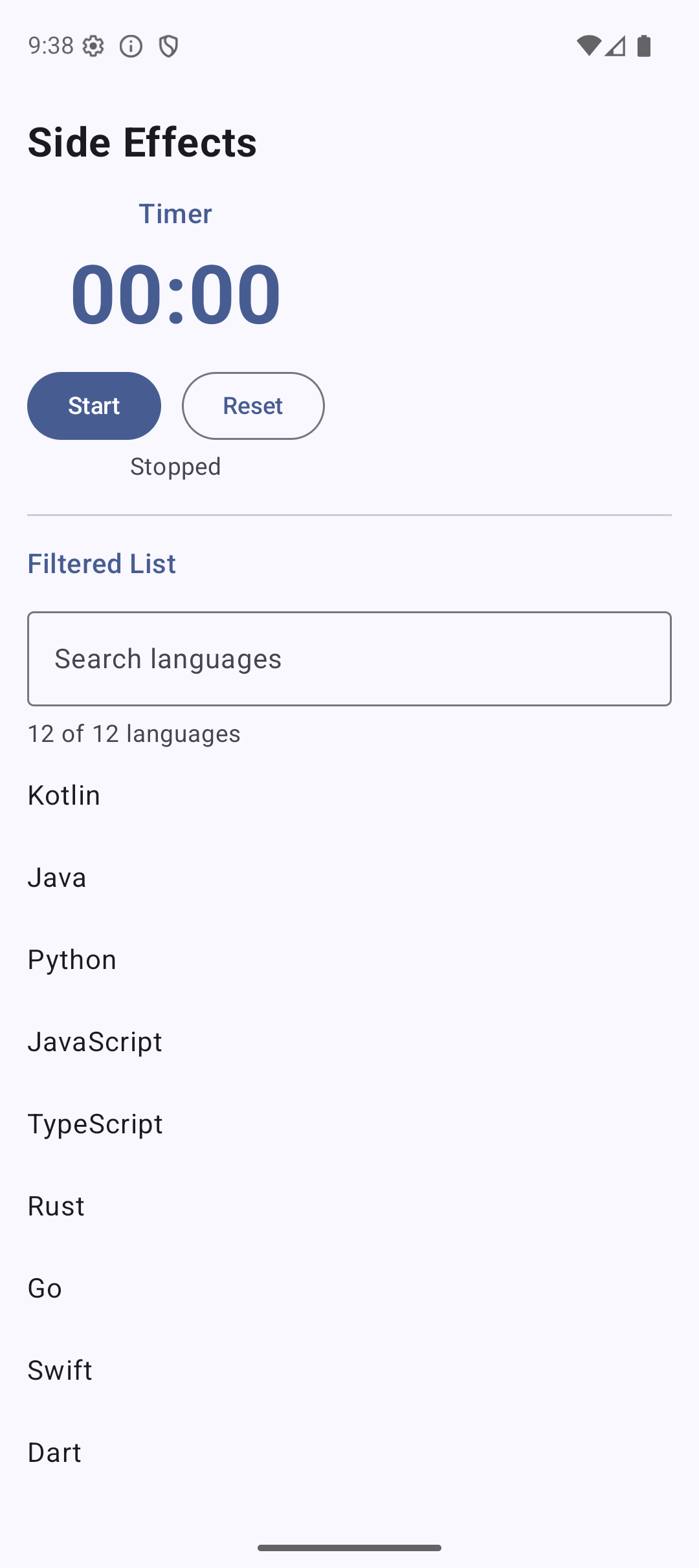
Practical Example: Build a Timer with Compose Side Effects
Let’s build a screen that combines multiple side effects:
@Composable
fun TimerScreen() {
    var seconds by remember { mutableStateOf(0) }
    var isRunning by remember { mutableStateOf(false) }
    val scope = rememberCoroutineScope()

    // Timer logic — runs when isRunning changes
    LaunchedEffect(isRunning) {
        if (isRunning) {
            // isActive ensures the loop stops immediately when cancelled
            while (isActive) {
                delay(1000)
                seconds++
            }
        }
        // When isRunning becomes false, LaunchedEffect reruns with new key
        // The old coroutine is cancelled automatically
    }

    Column(
        modifier = Modifier
            .fillMaxSize()
            .padding(24.dp),
        horizontalAlignment = Alignment.CenterHorizontally,
        verticalArrangement = Arrangement.Center
    ) {
        // Display time
        val minutes = seconds / 60
        val remainingSeconds = seconds % 60
        Text(
            text = "%02d:%02d".format(minutes, remainingSeconds),
            fontSize = 64.sp,
            fontWeight = FontWeight.Bold,
            color = MaterialTheme.colorScheme.primary
        )

        Spacer(modifier = Modifier.height(32.dp))

        // Control buttons
        Row(horizontalArrangement = Arrangement.spacedBy(16.dp)) {
            // Start/Pause — user event, could use scope but onClick is fine
            Button(onClick = { isRunning = !isRunning }) {
                Text(if (isRunning) "Pause" else "Start")
            }

            // Reset
            OutlinedButton(
                onClick = {
                    isRunning = false
                    seconds = 0
                }
            ) {
                Text("Reset")
            }
        }

        Spacer(modifier = Modifier.height(16.dp))

        Text(
            text = if (isRunning) "Running..." else "Stopped",
            color = MaterialTheme.colorScheme.onSurfaceVariant
        )
    }
}
This timer uses:
LaunchedEffect(isRunning)— starts/stops the timer whenisRunningchanges- State (
seconds,isRunning) — tracks the current time and running status - Automatic cancellation — when
isRunningbecomesfalse, LaunchedEffect reruns and the oldwhile(true)loop is cancelled
Decision Table: Which Side Effect to Use?
| Situation | Use This |
|---|---|
| Load data when screen opens | LaunchedEffect(Unit) |
| Reload data when ID changes | LaunchedEffect(id) |
| Show snackbar on error | LaunchedEffect(error) |
| Register/unregister listener | DisposableEffect + onDispose |
| Observe lifecycle events | DisposableEffect(lifecycleOwner) |
| Launch coroutine from button click | rememberCoroutineScope |
| Expensive filtered/sorted list | derivedStateOf |
| Sync with external system on every recomposition | SideEffect |
Common Mistakes
Mistake 1: API Call Without LaunchedEffect
// BAD — runs on every recomposition (could be 10x per second)
@Composable
fun UserScreen(userId: String) {
    val user = api.getUser(userId) // This is not a suspend function call
}

// GOOD — runs once, reruns only when userId changes
@Composable
fun UserScreen(userId: String) {
    var user by remember { mutableStateOf<User?>(null) }
    LaunchedEffect(userId) {
        user = api.getUser(userId)
    }
}
Mistake 2: Forgetting onDispose
// BAD — listener is never removed, causes memory leak
DisposableEffect(Unit) {
    val listener = SomeListener()
    manager.addListener(listener)
    // Missing onDispose!
}

// GOOD — always clean up
DisposableEffect(Unit) {
    val listener = SomeListener()
    manager.addListener(listener)
    onDispose {
        manager.removeListener(listener)
    }
}
Mistake 3: Using rememberCoroutineScope for Data Loading
// BAD — launches a new coroutine on every recomposition if placed wrong
val scope = rememberCoroutineScope()
scope.launch { loadData() } // Wrong! This is not inside a click handler

// GOOD — use LaunchedEffect for automatic data loading
LaunchedEffect(Unit) {
    loadData()
}
Mistake 4: Wrong Key in LaunchedEffect
// BAD — reruns on every recomposition because a new list is created each time
LaunchedEffect(listOf(1, 2, 3)) {
    loadData()
}

// GOOD — use a stable key
LaunchedEffect(Unit) {
    loadData()
}
Quick Reference
| API | Runs When | Coroutine | Cleanup | Use For |
|---|---|---|---|---|
LaunchedEffect(key) | Key changes | Yes | Auto-cancel | Data loading, delays |
DisposableEffect(key) | Key changes | No | onDispose { } | Listeners, observers |
rememberCoroutineScope | Manual .launch | Yes | Auto-cancel | Button clicks, events |
derivedStateOf | Inputs change | No | None | Expensive computations |
SideEffect | Every recomposition | No | None | Sync with external code |
Result
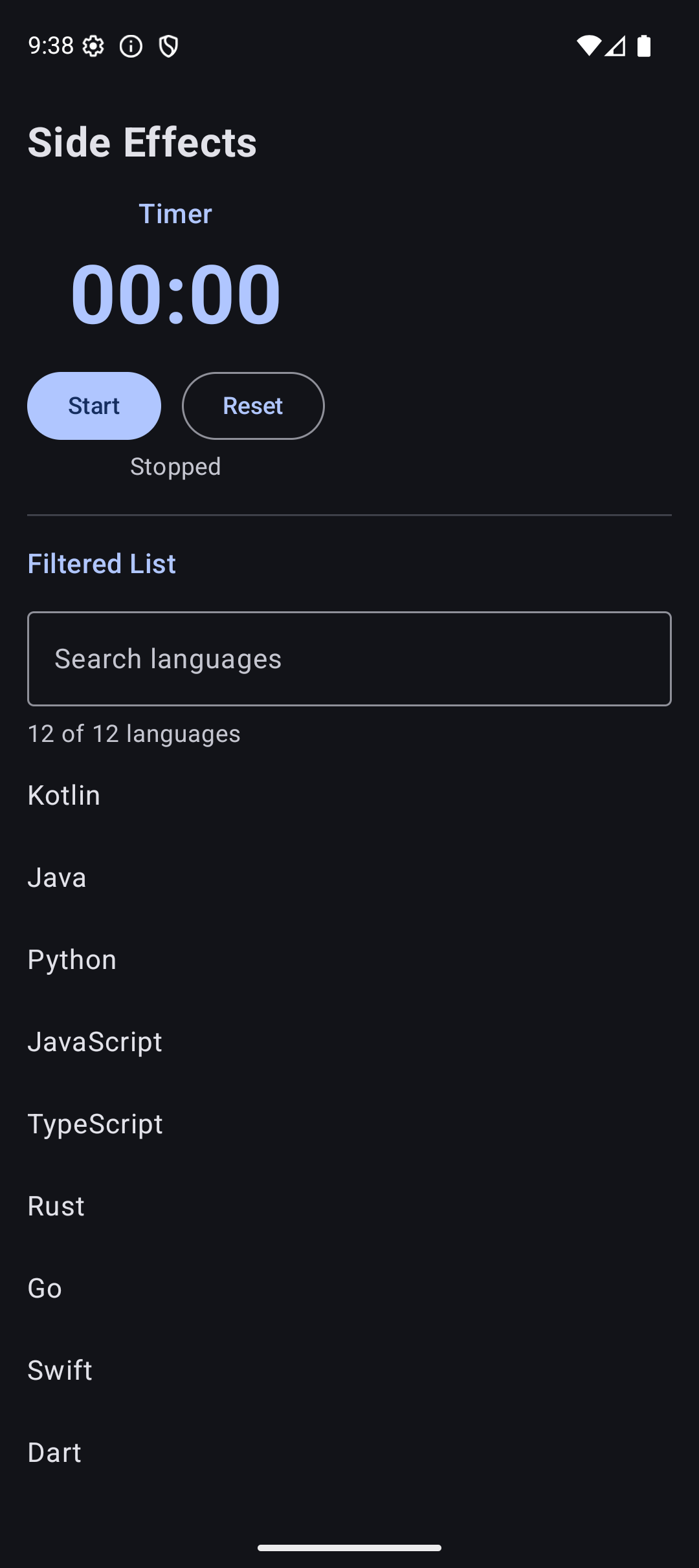
Here is what the timer app looks like when you run the code from this tutorial:
| Light Mode | Dark Mode |
|---|---|
 |  |
Source Code
The complete working code for this tutorial is on GitHub:
Related Tutorials
- Tutorial #5: State —
rememberandmutableStateOfbasics that side effects build on - Tutorial #9: ViewModel —
viewModelScopefor coroutines in ViewModel - Tutorial #10: MVI — handling side effects in the MVI pattern
- Jetpack Compose Cheat Sheet — quick reference for every component and modifier.
- Full Series: Jetpack Compose Tutorial — all 25 tutorials from zero to publishing.
What’s Next?
In the next tutorial, we will learn about Retrofit with Compose — making real API calls, handling loading and error states, and displaying data from the internet in your app.
See you there.