In Tutorial #5, we learned about remember and mutableStateOf. They work great for simple state. But they have a big problem — when your app needs to load data from a database or API, where does that logic go?
Not in the Composable. Composables are for UI, not business logic.
That is what ViewModel is for.
What is ViewModel?
ViewModel is a class that holds your screen’s data and logic. It survives things that destroy and recreate your Composable — like screen rotation or system theme changes.
Think of it this way:
| Composable | ViewModel | |
|---|---|---|
| Purpose | Show the UI | Hold data and logic |
| Survives rotation | No (redraws) | Yes |
| Survives process death | No | No (use SavedStateHandle) |
| Knows about UI | Yes | No |
| Lifecycle | Created/destroyed with screen | Lives as long as the screen exists |
The rule: UI code goes in Composables. Everything else goes in ViewModel.
Why Not Just Use remember?
// This works... until it doesn't
@Composable
fun UserListScreen() {
    var users by remember { mutableStateOf<List<User>>(emptyList()) }
    var isLoading by remember { mutableStateOf(true) }

    LaunchedEffect(Unit) {
        isLoading = true
        users = api.getUsers()  // API call inside a Composable?
        isLoading = false
    }

    // Show users...
}
Problems with this approach:
- API call restarts on every rotation —
rememberdoesn’t survive configuration changes - Logic mixed with UI — hard to test, hard to maintain
- No separation — the same function handles data loading AND displaying
ViewModel fixes all three.
Your First ViewModel
Step 1: Create the ViewModel
class UserListViewModel : ViewModel() {

    // StateFlow holds the data — Compose observes it
    private val _users = MutableStateFlow<List<User>>(emptyList())
    val users: StateFlow<List<User>> = _users.asStateFlow()

    private val _isLoading = MutableStateFlow(true)
    val isLoading: StateFlow<Boolean> = _isLoading.asStateFlow()

    init {
        // Load data when ViewModel is created (once, not on every rotation)
        loadUsers()
    }

    private fun loadUsers() {
        viewModelScope.launch {
            _isLoading.value = true
            _users.value = listOf(
                User("1", "Alex", "alex@example.com"),
                User("2", "Sam", "sam@example.com"),
                User("3", "Jordan", "jordan@example.com"),
            )
            _isLoading.value = false
        }
    }

    fun deleteUser(userId: String) {
        _users.value = _users.value.filter { it.id != userId }
    }
}

data class User(val id: String, val name: String, val email: String)
Step 2: Connect ViewModel to Compose
@Composable
fun UserListScreen(viewModel: UserListViewModel = viewModel()) {
    // collectAsStateWithLifecycle is the recommended way to observe StateFlow
    // It stops collecting when the app is in the background (saves resources)
    // Requires: implementation("androidx.lifecycle:lifecycle-runtime-compose:2.6.1")
    val users by viewModel.users.collectAsStateWithLifecycle()
    val isLoading by viewModel.isLoading.collectAsStateWithLifecycle()

    if (isLoading) {
        // Show loading spinner
        Box(modifier = Modifier.fillMaxSize(), contentAlignment = Alignment.Center) {
            CircularProgressIndicator()
        }
    } else {
        // Show user list
        LazyColumn {
            items(users, key = { it.id }) { user ->
                UserRow(
                    user = user,
                    onDelete = { viewModel.deleteUser(user.id) }
                )
            }
        }
    }
}
That’s it. The ViewModel loads data once. Rotation doesn’t restart the load. The UI just observes and displays.
StateFlow vs mutableStateOf
Both hold state. When should you use which?
mutableStateOf | StateFlow | |
|---|---|---|
| Where | Inside Composables | Inside ViewModels |
| Observe in Compose | Direct (by state) | collectAsState() |
| Thread safe | No (main thread only) | Yes (any thread) |
| Coroutine friendly | No | Yes |
| Use for | UI-only state (toggle, animation) | Data from ViewModel |
Simple rule: Use mutableStateOf with remember inside Composables for UI state. Use StateFlow inside ViewModels for data state.
ViewModel with One State Object (Recommended)
Instead of having multiple StateFlows, combine everything into one state class. This is the same idea from the MVI tutorial (#10):
// One data class holds everything the screen needs
data class UserListState(
    val users: List<User> = emptyList(),
    val isLoading: Boolean = true,
    val error: String? = null,
    val searchQuery: String = ""
)

class UserListViewModel : ViewModel() {

    private val _state = MutableStateFlow(UserListState())
    val state: StateFlow<UserListState> = _state.asStateFlow()

    init {
        loadUsers()
    }

    private fun loadUsers() {
        viewModelScope.launch {
            _state.update { it.copy(isLoading = true, error = null) }

            try {
                val users = listOf(
                    User("1", "Alex", "alex@example.com"),
                    User("2", "Sam", "sam@example.com"),
                    User("3", "Jordan", "jordan@example.com"),
                    User("4", "Taylor", "taylor@example.com"),
                    User("5", "Morgan", "morgan@example.com"),
                )
                _state.update { it.copy(users = users, isLoading = false) }
            } catch (e: Exception) {
                _state.update { it.copy(error = e.message, isLoading = false) }
            }
        }
    }

    fun onSearchQueryChange(query: String) {
        _state.update { it.copy(searchQuery = query) }
    }

    fun deleteUser(userId: String) {
        _state.update { currentState ->
            currentState.copy(
                users = currentState.users.filter { it.id != userId }
            )
        }
    }

    fun retry() {
        loadUsers()
    }
}
The Composable:
@Composable
fun UserListScreen(viewModel: UserListViewModel = viewModel()) {
    val state by viewModel.state.collectAsStateWithLifecycle()

    Column(modifier = Modifier.fillMaxSize()) {
        // Search bar
        OutlinedTextField(
            value = state.searchQuery,
            onValueChange = { viewModel.onSearchQueryChange(it) },
            label = { Text("Search") },
            modifier = Modifier
                .fillMaxWidth()
                .padding(16.dp)
        )

        when {
            state.isLoading -> {
                Box(
                    modifier = Modifier.fillMaxSize(),
                    contentAlignment = Alignment.Center
                ) {
                    CircularProgressIndicator()
                }
            }
            state.error != null -> {
                Column(
                    modifier = Modifier.fillMaxSize(),
                    verticalArrangement = Arrangement.Center,
                    horizontalAlignment = Alignment.CenterHorizontally
                ) {
                    Text("Error: ${state.error}")
                    Button(onClick = { viewModel.retry() }) {
                        Text("Retry")
                    }
                }
            }
            else -> {
                // Filter users based on search query
                val filteredUsers = state.users.filter {
                    it.name.contains(state.searchQuery, ignoreCase = true)
                }

                LazyColumn {
                    items(filteredUsers, key = { it.id }) { user ->
                        UserRow(
                            user = user,
                            onDelete = { viewModel.deleteUser(user.id) }
                        )
                    }
                }
            }
        }
    }
}
One state object makes your screen predictable. You always know what data is available by looking at the state class.
ViewModel with Navigation Arguments
When you navigate to a screen with arguments (from Tutorial #8), the ViewModel can read them using SavedStateHandle:
@Serializable
data class UserProfile(val userId: String)

class UserProfileViewModel(
    savedStateHandle: SavedStateHandle
) : ViewModel() {

    // Read the navigation argument
    private val route = savedStateHandle.toRoute<UserProfile>()
    private val userId = route.userId

    private val _state = MutableStateFlow(ProfileState())
    val state: StateFlow<ProfileState> = _state.asStateFlow()

    init {
        loadProfile(userId)
    }

    private fun loadProfile(id: String) {
        viewModelScope.launch {
            // In a real app, fetch from database or API using the ID
            _state.update {
                it.copy(
                    name = "User $id",
                    email = "$id@example.com",
                    isLoading = false
                )
            }
        }
    }
}

data class ProfileState(
    val name: String = "",
    val email: String = "",
    val isLoading: Boolean = true
)
In the NavHost:
composable<UserProfile> {
    // ViewModel is automatically created with the saved state handle
    val viewModel: UserProfileViewModel = viewModel()
    val state by viewModel.state.collectAsStateWithLifecycle()

    ProfileScreen(state = state)
}
The navigation passes the argument → SavedStateHandle stores it → ViewModel reads it. Clean and type-safe.
viewModelScope and Coroutines
ViewModel has a built-in coroutine scope called viewModelScope. It automatically cancels when the ViewModel is destroyed.
class MyViewModel : ViewModel() {

    fun loadData() {
        // This coroutine automatically cancels when ViewModel is destroyed
        viewModelScope.launch {
            val data = repository.fetchData()  // Suspend function
            _state.update { it.copy(data = data) }
        }
    }

    fun loadMultipleThings() {
        viewModelScope.launch {
            // Run two operations in parallel
            val users = async { repository.getUsers() }
            val posts = async { repository.getPosts() }

            _state.update {
                it.copy(
                    users = users.await(),
                    posts = posts.await()
                )
            }
        }
    }
}
Never use GlobalScope or create your own CoroutineScope in a ViewModel. Always use viewModelScope.
When State Changes in ViewModel vs Composable
Here is a clear guide:
Keep in ViewModel (StateFlow)
- Data from database or API
- User list, search results, form data
- Loading state, error messages
- Anything that should survive rotation
Keep in Composable (remember)
- Is the dropdown menu open?
- Current scroll position
- Which text field has focus?
- Animation progress
- Anything that is OK to reset on rotation
Example: Both Together
@Composable
fun UserListScreen(viewModel: UserListViewModel = viewModel()) {
    // ViewModel state — survives rotation
    val state by viewModel.state.collectAsStateWithLifecycle()

    // UI state — OK to reset on rotation
    var showDeleteDialog by remember { mutableStateOf(false) }
    var selectedUser by remember { mutableStateOf<User?>(null) }

    // ... use both kinds of state
}
Common Mistakes
Mistake 1: Creating ViewModel Manually
// BAD — new instance on every recomposition
val viewModel = UserListViewModel()

// GOOD — Compose manages the lifecycle
val viewModel: UserListViewModel = viewModel()
Mistake 2: Observing StateFlow Without collectAsState
// BAD — value doesn't trigger recomposition
val users = viewModel.users.value

// GOOD — triggers recomposition when value changes
val users by viewModel.users.collectAsState()
Mistake 3: Passing ViewModel to Child Composables
// BAD — child knows about ViewModel
@Composable
fun UserRow(viewModel: UserListViewModel, user: User) { ... }

// GOOD — child receives only what it needs
@Composable
fun UserRow(user: User, onDelete: () -> Unit) { ... }
Mistake 4: Doing UI Work in ViewModel
// BAD — ViewModel should not know about UI
class MyViewModel : ViewModel() {
    fun showToast(context: Context) { // Don't pass Context!
        Toast.makeText(context, "Done", Toast.LENGTH_SHORT).show()
    }
}

// GOOD — ViewModel sends an event, UI handles the display
class MyViewModel : ViewModel() {
    private val _showMessage = MutableStateFlow<String?>(null)
    val showMessage: StateFlow<String?> = _showMessage

    fun doSomething() {
        _showMessage.value = "Done"
    }
}
Quick Reference
| Action | Code |
|---|---|
| Create ViewModel | val viewModel: MyViewModel = viewModel() |
| Expose state | val state: StateFlow<MyState> = _state.asStateFlow() |
| Update state | _state.update { it.copy(loading = true) } |
| Observe in Compose | val state by viewModel.state.collectAsStateWithLifecycle() |
| Launch coroutine | viewModelScope.launch { ... } |
| Read nav argument | savedStateHandle.toRoute<MyRoute>() |
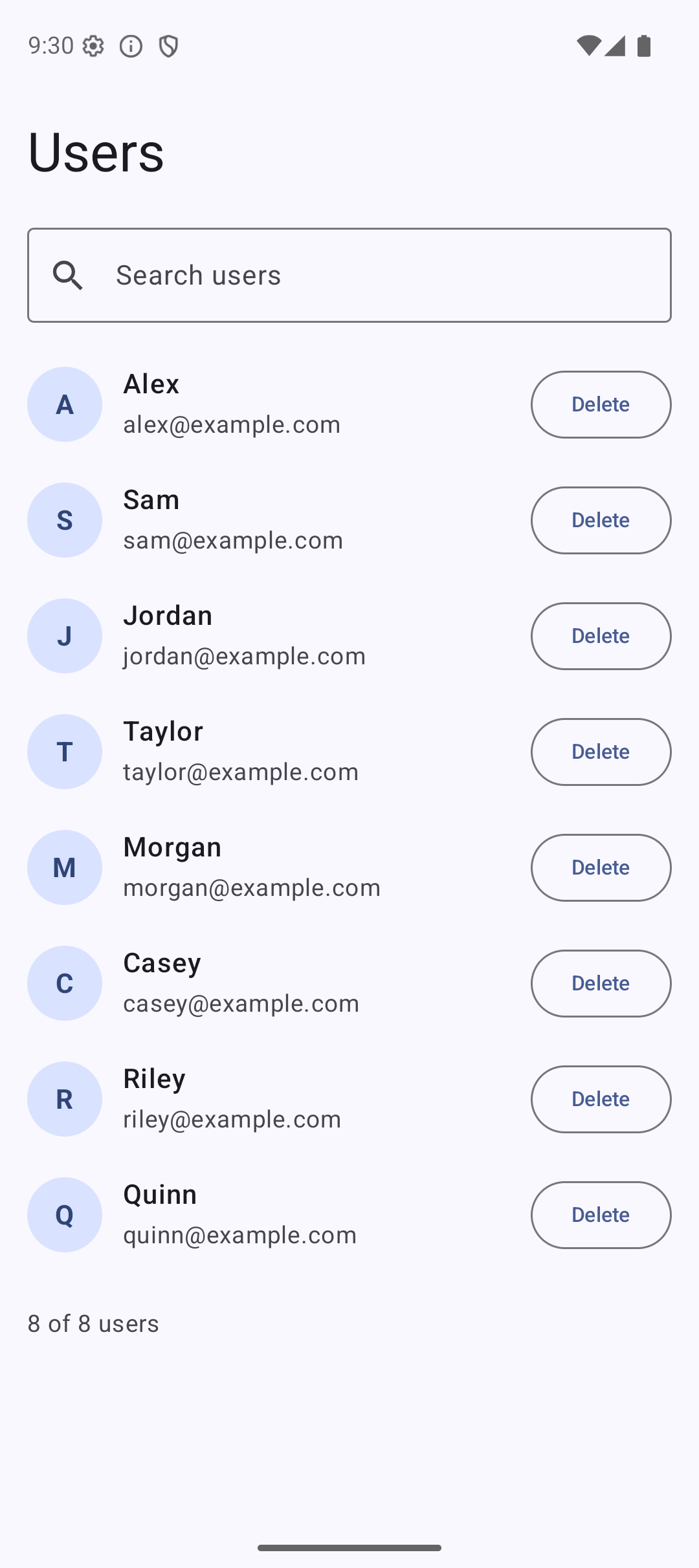
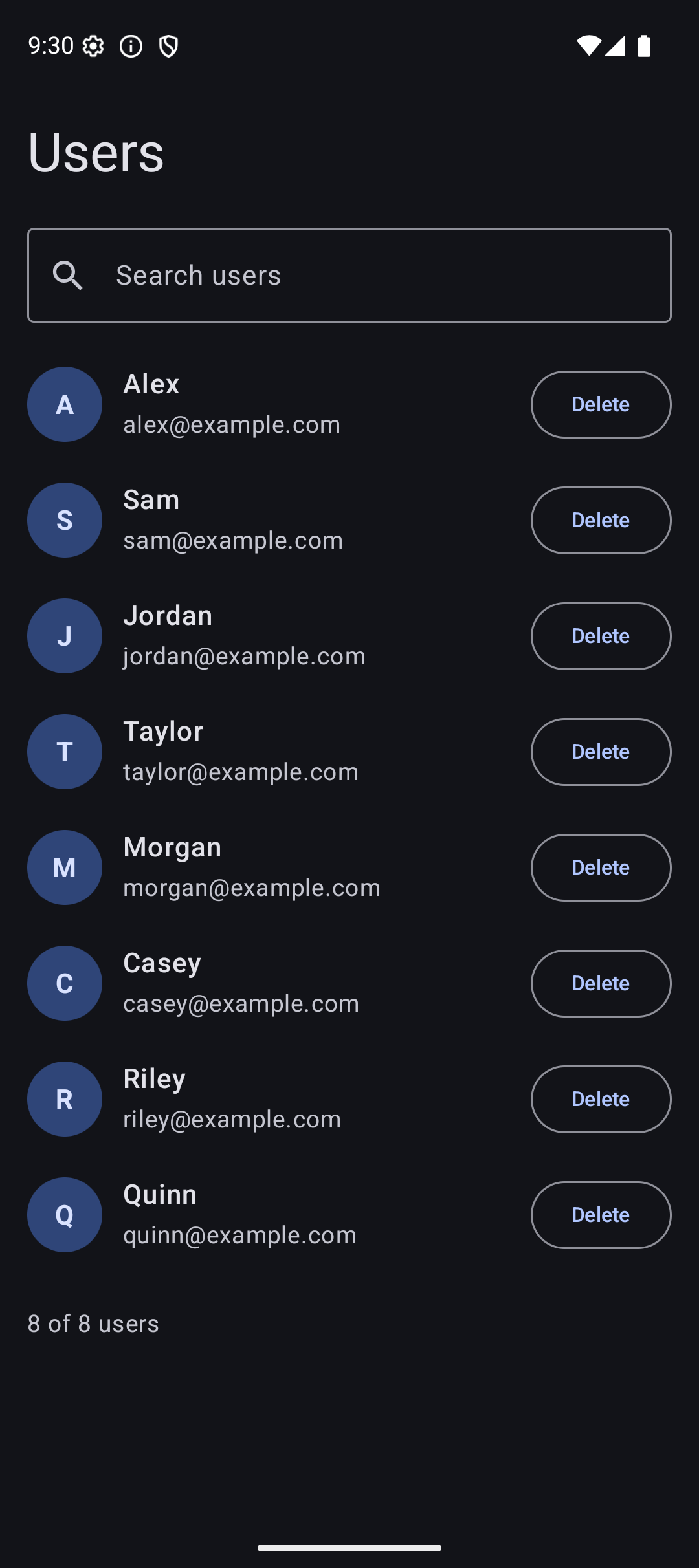
Result
Here is what the app looks like when you run the code from this tutorial:
| Light Mode | Dark Mode |
|---|---|
 |  |
Source Code
The complete working code for this tutorial is on GitHub:
Related Tutorials
- Tutorial #5: State —
rememberandmutableStateOfbasics - Tutorial #8: Navigation — passing arguments to ViewModels via
SavedStateHandle - Tutorial #10: MVI — ViewModel with the MVI pattern
- Jetpack Compose Cheat Sheet — quick reference for every component and modifier.
- Full Series: Jetpack Compose Tutorial — all 25 tutorials from zero to publishing.
What’s Next?
You now have ViewModel and MVI (Tutorial #10) covered. In the next tutorial, we will learn about Side Effects — LaunchedEffect, DisposableEffect, and how to safely run code that interacts with the outside world from your Composables.
See you there.